Most AI image generators can produce beautiful scenes. Put text in the prompt — a menu price, a poster title, a product label — and the letters often come back garbled, misspelled, or simply wrong. Two models take different approaches to this problem: MOSS-Image SFT, a 5B open model whose project emphasizes text rendering, and FLUX.1 dev, a general-purpose model from Black Forest Labs.
We ran both models on the same three prompts, the same seeds, and the same 1024 × 1024 canvas. Every result shown below is the first output — no cherry-picking, no regeneration to fix a mistake. The failures stay in the set because that is how real generation works.
Test method
| Setting | MOSS-Image SFT | FLUX.1 dev |
|---|---|---|
| Provider endpoint | fal-ai/moss-image | fal-ai/flux/dev |
| Canvas | 1024 × 1024 | 1024 × 1024 |
| Steps / guidance | 50 / CFG 3 | 28 / guidance 3.5 |
| Prompt handling | Expansion disabled | Exact submitted prompt |
| Selection | One run per prompt | One run per prompt |
Each pair used the same numeric seed. Different model architectures do not turn that into identical latent noise, so the seed controls repeatability within each model rather than visual equivalence across models. All files were generated on October 26, 2026, and were not cropped or retouched.
Test 1: Café menu — four items and aligned prices
Prompt:
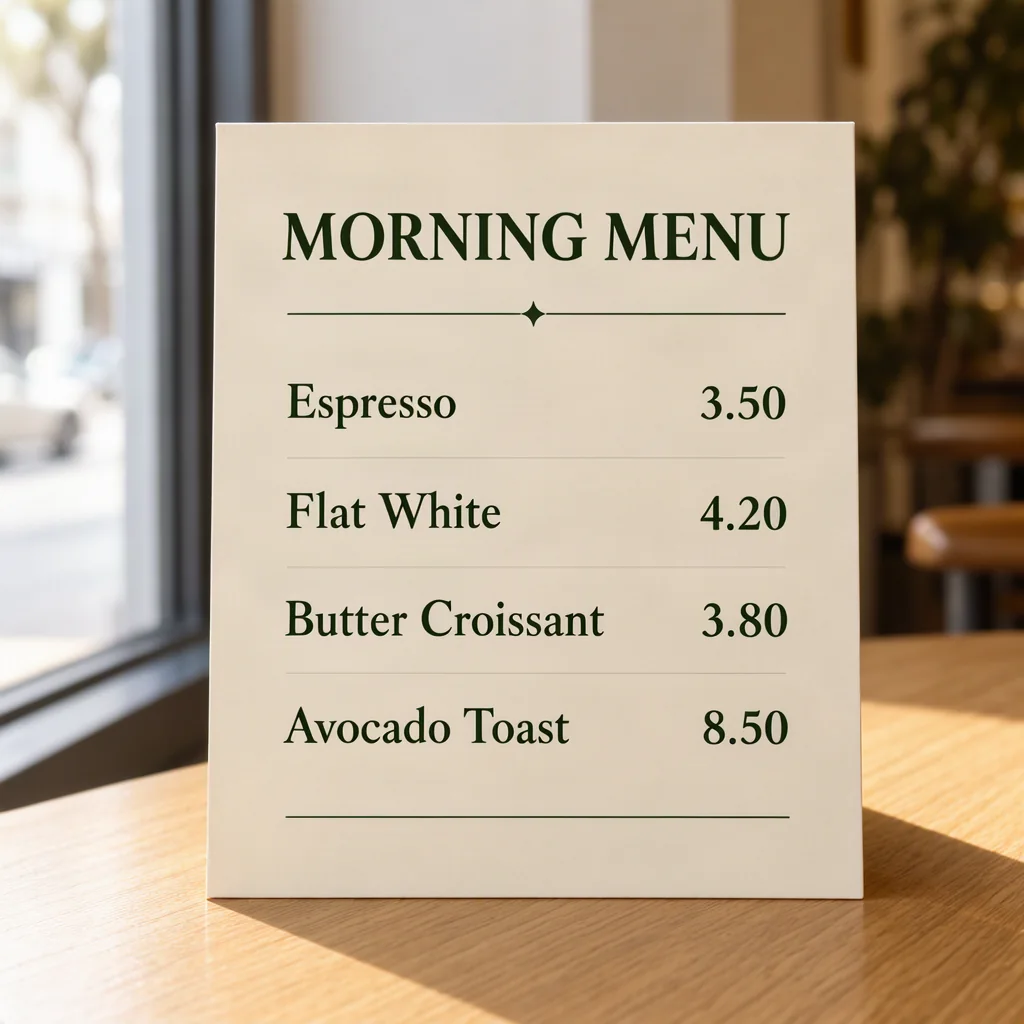
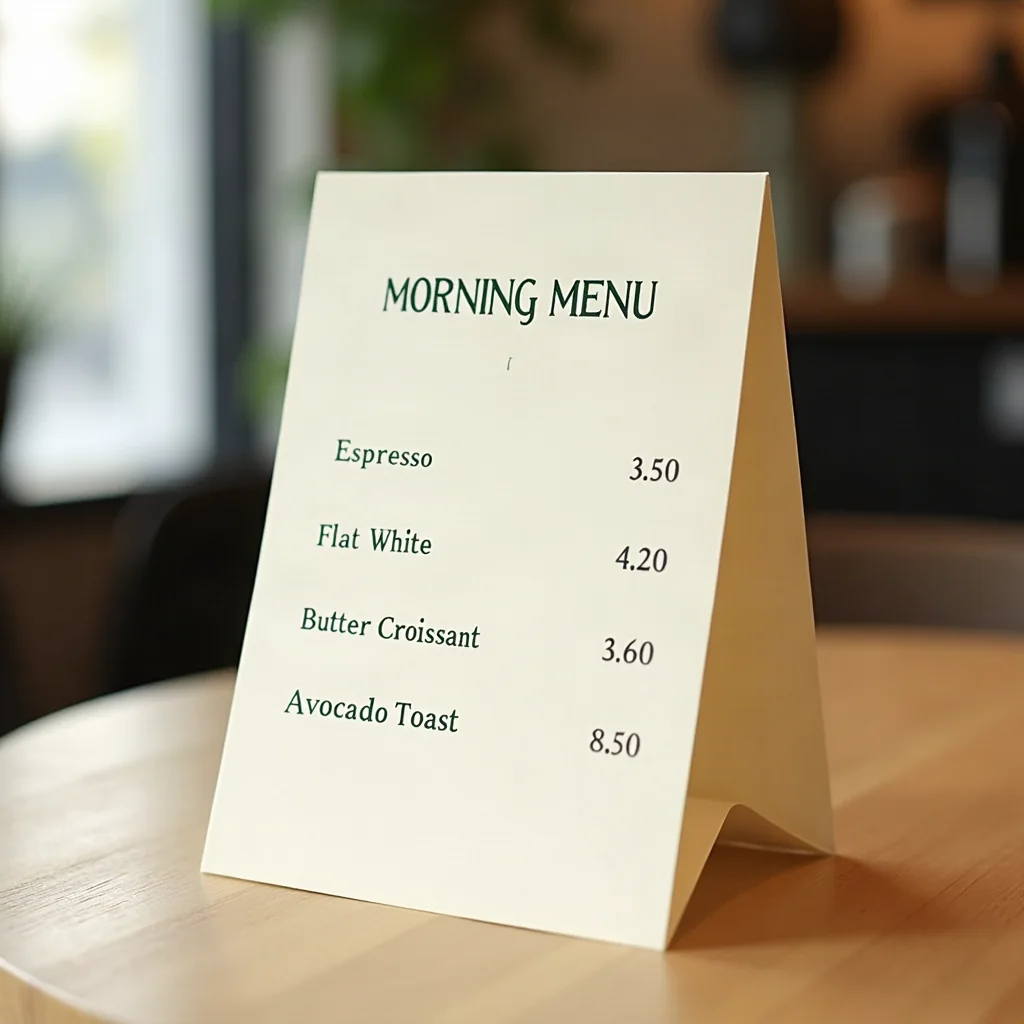
A café menu card standing on a light oak table, soft window light from the left. Cream card stock with dark green serif headings. Heading reads exactly: "MORNING MENU". Below it four lines read exactly: "Espresso 3.50", "Flat White 4.20", "Butter Croissant 3.80", "Avocado Toast 8.50". Prices are right-aligned in one column. All text spelled correctly and fully readable.
Seed: 2026102601
MOSS-Image SFT rendered all four requested items and prices as written. "Espresso 3.50", "Flat White 4.20", "Butter Croissant 3.80", and "Avocado Toast 8.50" all appeared correctly. The heading "MORNING MENU" was present and legible. The composition placed the card on a wooden surface with soft window light matching the prompt.
FLUX.1 dev produced a visually strong composition with clear layout. The heading and first two items were correct. But "Butter Croissant 3.80" became "Butter Croissant 3.60" — a price changed by twenty cents. In a real menu, that error would need a correction before publication.
The difference: Both models produced usable images. FLUX changed a number; MOSS did not. For a task where exact text matters, one error in four items means you need to inspect every output — or choose a model that gets it right more often.
Test 2: Product label — curved small print
Prompt:
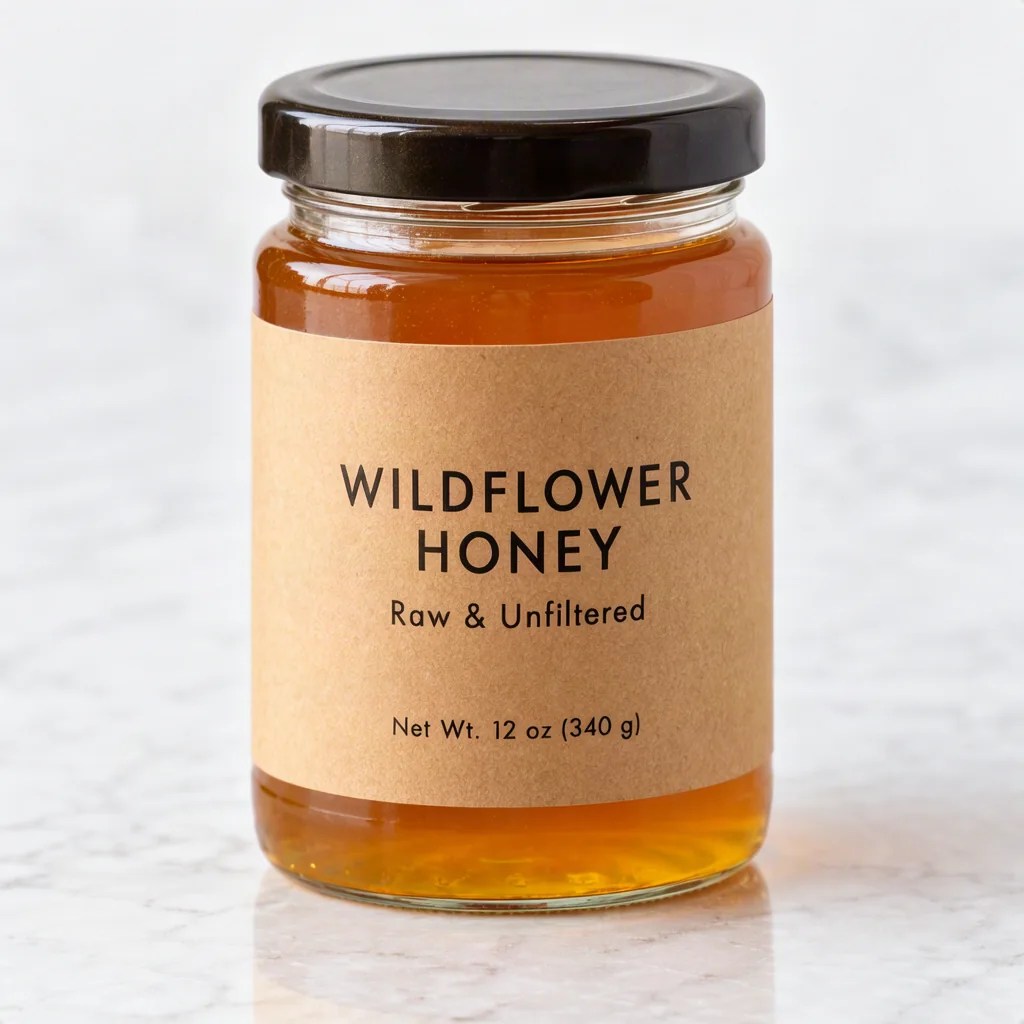
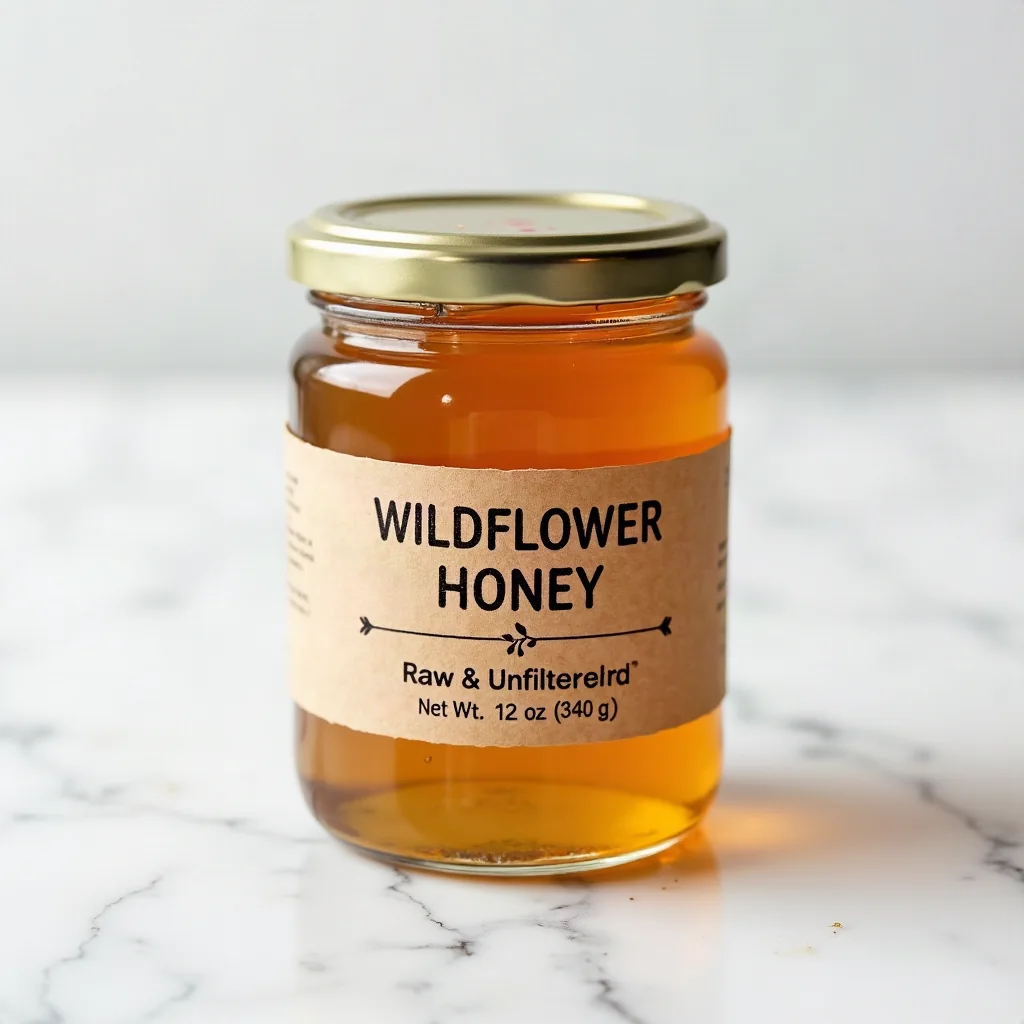
A honey jar on a white marble surface, kraft paper label with small print. The label front reads exactly: "WILDFLOWER HONEY", directly below "Raw & Unfiltered", and a small bottom line "Net Wt. 12 oz (340 g)". All label text is fully legible, correctly spelled, and follows the label curve.
Seed: 2026102605
MOSS-Image SFT rendered all three requested label lines as written. "WILDFLOWER HONEY" appeared as the heading, "Raw & Unfiltered" sat below it, and "Net Wt. 12 oz (340 g)" completed the bottom line. All text followed the label curve reasonably well.
FLUX.1 dev rendered the heading and net weight correctly, but the middle line became "Raw & Unfilterelrd" — misspelled to the point of being unusable on a product label. The visual quality of the jar and the marble surface was strong, but the text failure makes the image unsuitable for its intended purpose.
The difference: This test exposes the core trade-off. FLUX can create a more polished visual composition, but when the job requires exact wording on a curved surface, a single garbled word invalidates the output. MOSS-Image's SFT training on text rendering shows its value in exactly this scenario.
Test 3: Bilingual poster — Chinese, English, time and place
Prompt:
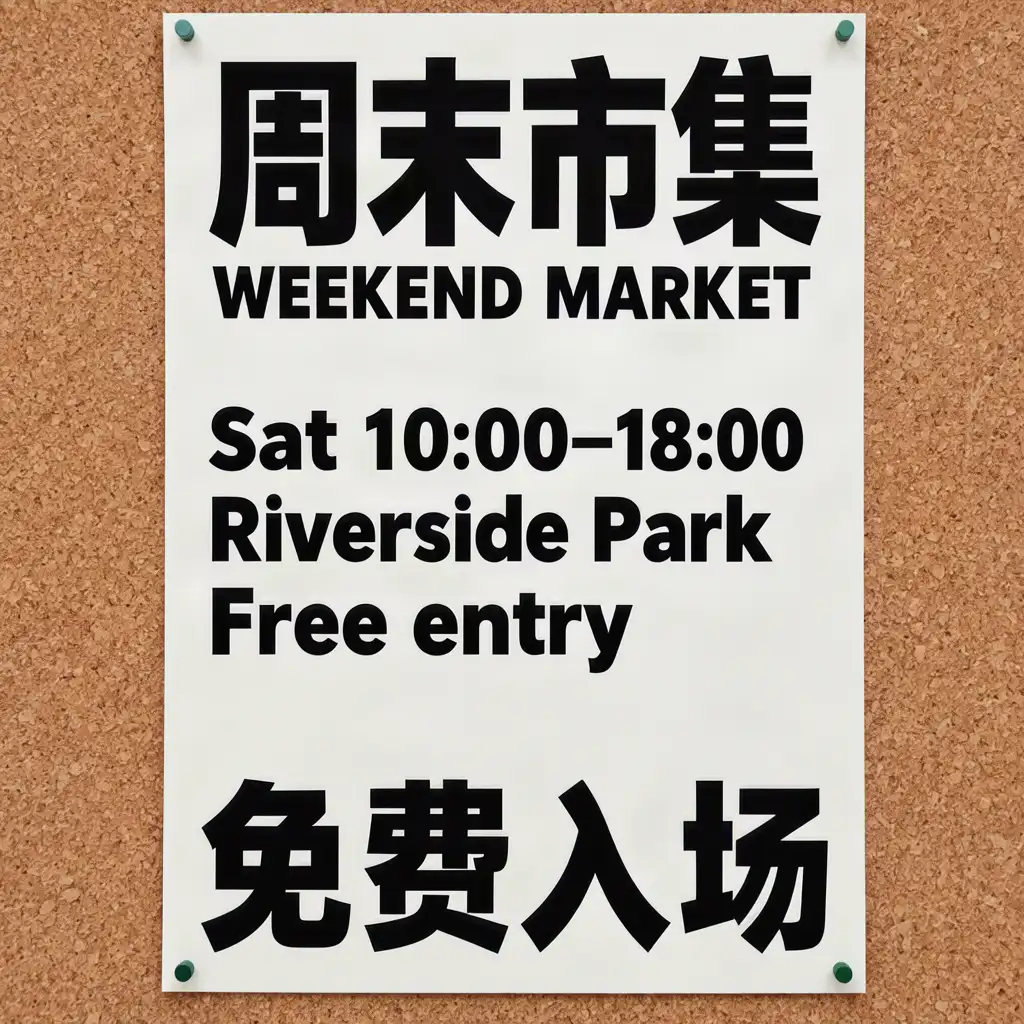
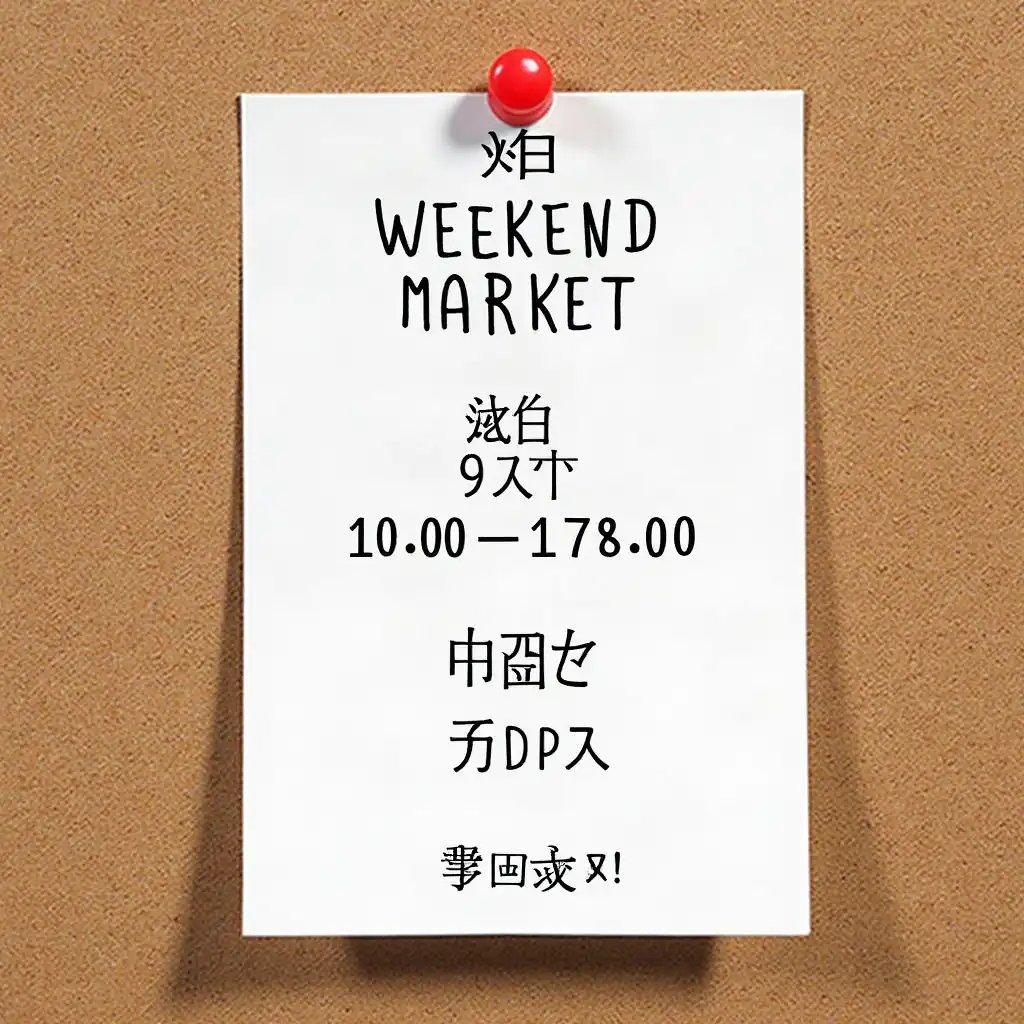
A vertical event poster pinned on a corkboard. Top heading reads exactly in Chinese: "周末市集", with English directly below: "WEEKEND MARKET". Middle text reads exactly: "Sat 10:00–18:00", "Riverside Park", "Free entry". A bottom line reads exactly in Chinese: "免费入场". Bold sans-serif, high contrast.
Seed: 2026102606
MOSS-Image SFT rendered the requested Chinese and English event details as written. "周末市集" and "WEEKEND MARKET" appeared as the heading pair. "Sat 10:00–18:00", "Riverside Park", and "Free entry" were present and legible. "免费入场" appeared at the bottom.
FLUX.1 dev produced a strong poster composition with good visual hierarchy, but the Chinese characters were garbled — the strokes were present but did not form recognizable characters. The time became "10.00–178.00" instead of "10:00–18:00". The event details were essentially lost.
The difference: This is the largest gap between the two models. In this output, FLUX did not preserve the requested Chinese characters or time, so that result was not usable for the bilingual brief. MOSS-Image was trained with Chinese text examples and it shows.
Capability overview
| Area | MOSS-Image SFT | FLUX.1 dev |
|---|---|---|
| Text focus | Fine-tuned for text rendering and layout following | General image generation with prompt-based text |
| Structured layout | Documented JSON text and object regions | No equivalent syntax in the official model card |
| Chinese text | Supported, with Chinese prompt examples in the official guide | The characters were garbled in this three-prompt test |
| Workflow | Native ComfyUI and optional HF-directory plugin | Established FLUX tools and ComfyUI workflows |
| License | Apache 2.0 | FLUX.1 dev Non-Commercial License |
When to use each model
Use MOSS-Image SFT when:
- Exact wording matters — menus, labels, posters, event materials
- You need Chinese characters rendered correctly
- You want JSON layout control for text placement
- You are building a tool or service that generates text-heavy images
- You need an Apache 2.0 license for commercial work
Use FLUX.1 dev when:
- Visual composition and photorealism are the priority and text is secondary
- You are working in English-only and short text strings
- You already have an established FLUX workflow
- The license terms fit your use case
One thing both models share: proofreading is not optional
Neither model guarantees correct text. Three examples cannot establish an overall winner — they show why text-heavy prompts need direct testing. A visually convincing output can still contain a changed price, a misspelled label, or an incorrect event time. Always inspect generated text at full resolution before publishing.
Try the comparison yourself
The same prompts and seeds are available in the studio. Open any example below, generate your own variation, and compare the results.
Official sources (checked October 26, 2026): MOSS-Image SFT model card · fal.ai MOSS-Image API · FLUX.1 dev model card
Three starter images are free with email verification. [Open the studio](/#studio)